If you’ve been researching website platforms, you’ve probably come across Showit — and if you’ve landed on Showit templates specifically, you’re close to making a decision. But with so many options out there, it can be hard to know what you’re actually looking for.
This post walks you through everything you need to know before buying a Showit template: what a template actually is, who it works well for, how to evaluate your options, and where to find good ones.
What Is a Showit Template?
Showit is a drag-and-drop website builder designed for creative entrepreneurs and service providers. Unlike platforms like Squarespace or WordPress, Showit gives you complete design freedom — every element on the page can be moved, resized, and styled exactly how you want it.
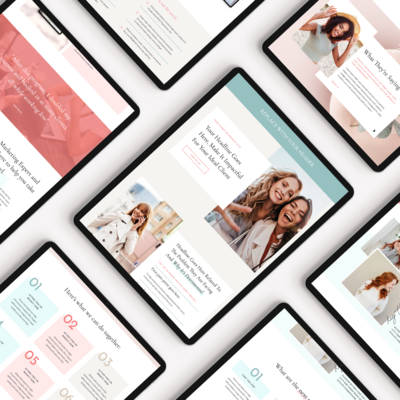
A Showit template is a pre-designed website built on that platform. When you purchase one, you get a fully designed site — layouts, fonts, color palette, page structure — that you customize with your own content, photos, and brand details.
Templates save you the time and cost of building a custom site from scratch while still giving you a professional, polished result.
Who Are Showit Templates For?
Showit templates are a great option if you:
- Are a service provider, photographer, or creative entrepreneur who needs a professional website
- Want a beautiful, design-forward site without hiring a custom web designer
- Love the drag-and-drop ability of Showit and want to launch a website quickly.
- Are comfortable doing some light customization on your own — or are willing to hire help for the setup
They’re probably not the right fit if you need heavy e-commerce functionality (Showit isn’t built for large product shops), if you want a fully hands-off setup where someone else builds everything, or if you’re looking for the cheapest possible option. Templates require some effort to make them your own.
How to Evaluate a Showit Template Before Buying
This is where most people rush — and where it pays to slow down.
1. Aesthetic fit vs. customization potential
The first thing most people do is fall for a template’s demo. That’s natural. But the demo is styled with specific photos, fonts, and colors that make it look a certain way. Your version will look different once your content is in it.
Instead of asking “do I love this demo?”, ask:
- Do I love the structure of this design — the way information is laid out, the amount of white space, the overall feel?
- Is the style something I could see myself in, even with my own photos and brand colors?
- Am I buying this because it fits my brand, or because I love someone else’s photos?
A template with good bones will translate well across different aesthetics. A template you chose because of the demo photos may disappoint once you swap in your own content.
2. Layout and page structure
Look carefully at what pages are included and how they’re structured. A solid template should include at minimum:
- Homepage
- About page
- Services or work page
- Contact page
- Blog (if you plan to blog — Showit uses WordPress for its blog)
Check the homepage layout specifically. Does it tell a clear story — who you are, what you do, who you serve, and what to do next? A good homepage structure will make your copywriting job easier.
Also look at how many sections each page has. More isn’t always better. Cluttered templates are harder to customize than clean, well-structured ones.
3. Your actual content needs
Before you buy, write down what you actually need your website to do. For most service providers, that includes:
- Introducing your brand and building trust
- Explaining your services and how to work with you
- Showcasing past work or client results
- Getting people to inquire or book a call
Make sure the template supports all of that. If you offer multiple services, does it have a layout for that? If you rely heavily on testimonials, does it have prominent spots for social proof? If you plan to blog, is the blog layout clean and readable?
If you are new to Showit, I wouldn’t recommend buying a template and then trying to retrofit your business into it. Start with your needs and find a template that matches.
4. Tech comfort level
Showit is one of the more beginner-friendly website platforms, but customizing a template still requires some time and comfort with the drag-and-drop editor.
If you’re brand new to Showit and want a simpler starting point, look for a template that is designed specifically for beginners — fewer pages, cleaner layout, less complexity to manage. Some designers offer starter kits or simplified templates at a lower price point for exactly this reason. There are some beautiful, very trendy templates out there but remember that the more “advanced” it is, the harder it may be to customize on your own. I personally try to keep all of my designs are user-friendly as possible so while they may not be the most cutting-edge in terms of design or trends, they are high-quality and impactful while still being easy for you to work with.
If you’re more experienced or planning to hire a designer to help with setup, you have more flexibility to choose a more elaborate design.
5. Support and documentation
This one gets overlooked. A good template comes with:
- Clear instructions for how to set it up
- Documentation or a video walkthrough
- Some form of support if you get stuck
Before buying, check whether the designer offers any setup guidance. A beautifully designed template with no support is frustrating to work with. A simpler template with good documentation is often a better investment. For example, templates from my shop come with access to my Website Workshop that will guide you through the whole process of customizing and launching your new Showit website.
Where to Find Quality Showit Templates
A few places to look:
Independent designers — Many Showit Design Partners sell templates directly through their own shops. Buying from an independent designer often means more personalized support, better documentation, and a more distinctive design.
Showit’s template marketplace — Showit has its own library of templates, which can be a starting point for browsing styles and layouts. Plus it features design partner templates so you can see a variety of styles and price points.
Design marketplaces — Sites like Creative Market and Etsy carry Showit templates, though quality and support vary significantly. I usually don’t recommend sourcing a template from these places, you may get lured into buying a $30 template and you truly get what you pay for. Be ready to invest in a higher quality template and it will serve your business much better!
When comparing options, prioritize designers who are active Showit users themselves. They tend to build better templates and offer more reliable support.
A Few Things to Keep in Mind
Before you decide on a template, here’s a rundown of things you should consider:
- Does the overall layout match how I want my site to function?
- Can I picture my own photos and brand in this design?
- Does it include all the pages I need?
- Does it have a blog layout if I plan to use one?
- Is there documentation or support included?
- Does the price reflect the quality and support offered?
There’s no perfect template — there’s the one that fits your brand, your content, and your launch timeline. The goal is to find something with good bones that you can make your own.
Ready to Browse?
If you’re looking for Showit templates designed for service providers, photographers, and creative entrepreneurs, you’re in the right place. My shop carries a diverse collection of templates built with clear layouts, thoughtful structure, and real business needs in mind.